Sunday, April 3, 2022

Blog Post # 5: A Horizon Reflection

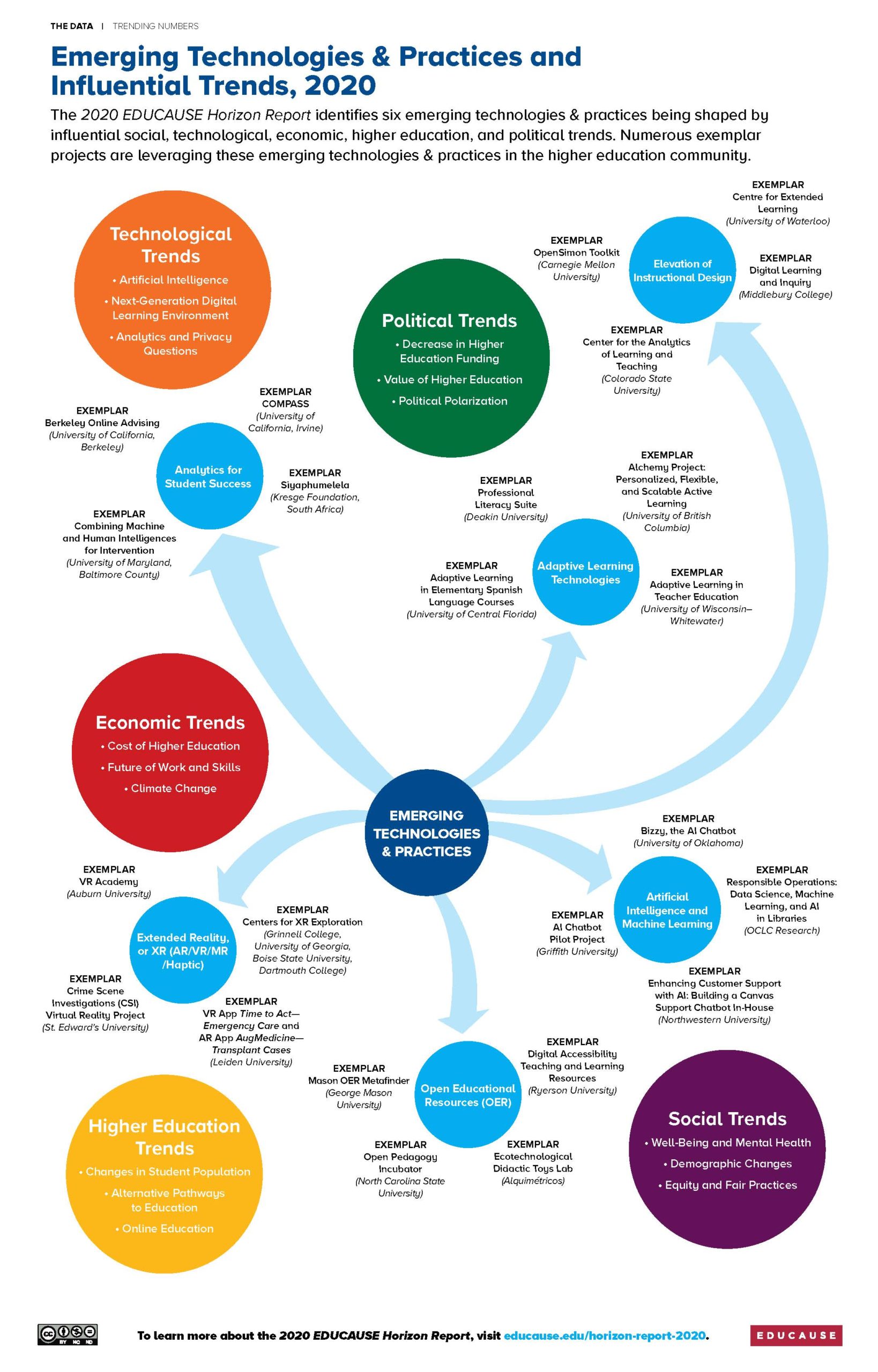
 Hi everyone! Hope everyone is doing well! It seems like the semester started, but it is wrapping up. Unfortunately this will be my last post here on blogger. Today I would like to simply reflect on an article from the 2021 Horizon report. I read an article on Social Trends. In this article it discussed how teaching and learning are a social practice, then they lead into talking about 2020 when covid hit and many schools were turned to remote learning. I really thought those who wrote this article did a great job at explaining how although the pandemic may be close to over, that teachers and staff will have to keep learning new ways of innovation for teaching and learning. Throughout 2020 and 2021 as we all know how challenging it was to learn in a remote learning environment, but this article shows that with all the technology and remote learning we have today we will see a widening of the digital divide. As Horizon shares in their article report, many students have or will fall behind due to the remote learning they endured during the pandemic. Reading and seeing first hand how remote / digital learning can affect how a student learns or where they stand in their education is shocking and is hard to grasp.  A connection I made with this article was on the topic of mental health issues. Not only did I but many others students suffered with mental health issues during the pandemic. Due to the isolation and lack of social connections with others it has been proven that the pandemic has caused many who never had problems before to have mental health issues. Having mental health issues can make a student struggle in learning and with interactions with others. I feel that I chose a great article, I was able to make connections and see another perspective on the impact of the pandemic. This may be the last post, but it was great to make a connection with something so important in education! 😃


Link It!


2021 EDUCAUSE Horizon Report® #Teaching and #Learning Edition | bluesyemre


Strategic ed tech planning with the 2020 Horizon Report by EDUCAUSE - GeoEd  Trek - AGU Blogosphere

Friday, March 25, 2022

Blog Post # 4: Online/Digital Resources

 Hi everyone! It's been a minute since I posted. This week I will be discussing how online and digital resources benefit me now and as a future teacher! The four categories I looked at and found helpful resources were Tech Gadgets -Bloomin' Apps, Augmented and Virtual Reality -AR moon explore solar systems, Digital Storytelling- Canva Storyboard Creator, and Bulletin Boards- Preschool Bulletin Board Ideas. When looking at the tech gadgets I found that an app listed on the Bloomin' app was the Spark video app. As you know we have utilized this app before, it is a very good app and is great for making videos for classes. This resource will be great to use as a teacher because it will allow me to make fun and attention-grabbing videos for the class! The second category involved augmented and virtual reality, an app I found that could be a fun way for students to get involved with learning the solar systems is the AR moon app. This app allows students to use a camera lens to show doors to the moon, this is a fun and interactive way to help students learn about solar systems. The next category I looked at was Digital storytelling, through this I learned of a website called Canva Storyboard creator. This website allows you to create a storyboard to make a creative plan for how a video project showing how it should be laid out. This website also allows you to share with others, this would be good to use as a teacher if you have a presentation with other colleges. The last resource I will talk about is bulletin boards, when looking at the websites I found one that gives you many ideas on how to create a bulletin board for a preschool class. I can utilize this when I teach in my own classroom, by finding boards that go along with the theme of the year or different holidays. I really enjoyed looking at all of these resources, I plan on implementing them in my future classroom one day! 😀 


Take A Look At These Resources!


AR Moon - Explore Solar System on the App Store (apple.com)


Saturday, February 19, 2022

Post # 3: Interactive SMART Boards

Hi everyone! This past week in 21st-century tech we have been learning how to use lumio and smart board! I have really enjoyed using lumio to create an interactive lesson. Using lumio has allowed me to embed activities or games that the students could do during the lesson to help them memorize and learn the materials! As we have researched and watched a video on the SMARTboard this past week I think this is a great interactive tool to use in the classroom! In the video, we learn that the SMARTboard allows you and your students to write with a pen, your hand, or any other object. This is great because if the pens are lost you can still teach the lesson that you planned for that day. The SMARTboard is great for allowing students to get interactive by coming to the board and participating. Interactive participation in class helps each student to stay engaged and actually learn the materials. After doing some research on my own I found that other than SMARTboard the Vibe collaboration board is very similar. Both of these boards are similar in that they allow teachers and students to use touch screen technology throughout the lesson. Vibe is wire-free and can be rolled around the classroom, it also connects with your cloud so nothing ever gets lost. A big difference between the two is that the SMARTboard not only has a touch screen but is also a projector and well. I think these two interactive boards are different but they are great for the classroom. I would definitely use SMARTboard due to its features of touch and a projector as well! 😀


Take a closer look at Vibe!

Vibe introduction - YouTube


SMARTboard

Saturday, February 5, 2022

Post # 2: Concept Mapping and The Instructional Video Development Process

 Hi everyone! Over the past week in technology for the 21st-century we have used concept mapping and have been asked to do research on the instructional video development process. Learning to use concept mapping helps us to organize and brainstorm ideas for our instructional videos that we will be constructing later on. For my instructional video, I have chosen to make a wooden beaded floral wreath. Concept mapping is very useful for organizing your ideas and thoughts for your storyboard. Personally, using concept mapping helped me organize and break up my instructions, materials, and the flow of my video. In a storyboard, you draw out the actions that will take place in your video and give a brief description of what your drawing means, this allows you to have a drawn visual of how you can shoot your video when it comes time. Storyboarding has been my favorite part of the project because it has allowed me to be creative in what I draw for each section. While researching the instructional video development process I found the article from eLearning Industry that gives five stages to develop your instructional video. In the article, the five stages are, gathering information, instructional design, storyboarding, visual design, and first draft animation. So far in class, we have completed stages 1-3! Each stage of this process helps us to add more and more to each component. Once we apply each step it helps us to get closer to having a final product which is our video! I have really enjoyed learning to use concept mapping and this video process, both have helped me learn to organize my thoughts and ideas in a new way that I have never tried before. I really like organizing with concept mapping and plan to use it for other classes in the future! Until the next blog!😃

Picture of my Concept Map: 


Take a peek at this Video! (Instructional Video Development Process)

Take a peek at this Article! ( 5 Stages of  Video Development)

Saturday, January 22, 2022

Post #1: Technology I've Experienced

Being an education major we are constantly learning how to use new technology in our classrooms and in our everyday lives. Over the past week, I have learned how to efficiently create and embed an Adobe spark video I created. Overall, my experience creating and submitting the video was easy, due to the fact of using the app or website before. I think Adobe Spark is a great tool to get to know someone in a creative and new way. Although Adobe spark is rather simple to use I think the one issue I had was that the app I used did not link to the new upgraded version of Adobe Cloud express. I found out that with using the app I could not efficiently embed my video. After many trials and errors, I finally figured out a way to embed my video. I first had to email the video from the app to myself, then I clicked on the link that sent me to the website of Adobe cloud express, finally, I could use the embed link for my video. Thinking I had finally found the correct way to submit the assignment for this past week, I was missing a step. I then discovered that on our Ipads the steps we were supposed to follow were not matching up to the actual submission process. I then tried to submit it on my laptop and found that the steps matched up and I could embed the video and submit it! Although this assignment was a challenge I am glad that I was able to figure it out on my own and learn something new that I thought I would never be able to!😃


Take a peek at my video HERE!

Website Used

Blog Post # 5: A Horizon Reflection

  Hi everyone! Hope everyone is doing well! It seems like the semester started, but it is wrapping up. Unfortunately this will be my last po...